
Are you bored using the Internet Explorer 8 with default addons?
There are top 5 add-ons which will really make the IE8
secure,
efficient,
user friendly and
much more......So why wait? Start using the below 5 addons and enjoy browsing with IE8!
1.
Bizform Bar (To download this add-on
click here)
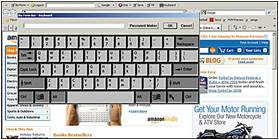
Bizform Bar is a password manager & form filler. It allows you to safely save online forms and online passwords which are encrypted safely. The main feature of this add-on is, it offers a
Virtual Keyboard so that the users can safely enter the critical information without the fear of
keylogger or other spyware.
2.
Digg's Main Page Top Ten Details(To download this add-on
click here)
This webslice is used for discovering the most popular stories which are voted by the digg community. This add-on is also used to subscribe the feed of the top 10 stories.
3.
Wikipedia Visual Search (To download this add-on
click here)

To get the instant answers from Wikipedia use this add-on.
4.
Yoono (To download this add-on
click here)

To get all your friend's updates automatically, then use this add-on. This add-on allows you to update your status instantly across twitter, facebook, myspace and much more. It also allows
to share your discoveries with your friends!
5.
IE7 Pro (To download this add-on
click here)

IE7 Pro gives many of the best features of firefox and brings now to IE8. IE7 Pro includes an ad blocker, spell checker, crash recovery, and much more.....
 Home
Home Notes
Notes Computer Tricks
 Sci-Tech
 FAQ
FAQ Contact


 Google toolbar 5 beta has released now. It has more improved features than its previous versions!
  Google has improved the Autofill feature and the exciting feature in the autofill form is, we an create multiple profiles for Autofill feature!

 Are you bored using the Internet Explorer 8 with default addons?
 Bizform Bar is a password manager & form filler. It allows you to safely save online forms and online passwords which are encrypted safely. The main feature of this add-on is, it offers a Virtual Keyboard so that the users can safely enter the critical information without the fear of
 This webslice is used for discovering the most popular stories which are voted by the digg community. This add-on is also used to subscribe the feed of the top 10 stories.
 To get all your friend's updates automatically, then use this add-on. This add-on allows you to update your status instantly across twitter, facebook, myspace and much more. It also allows
 IE7 Pro gives many of the best features of firefox and brings now to IE8. IE7 Pro includes an ad blocker, spell checker, crash recovery, and much more.....
